> For the complete documentation index, see [llms.txt](https://doc.batch.com/llms.txt). Markdown versions of documentation pages are available by appending `.md` to page URLs; this page is available as [Markdown](https://doc.batch.com/guides-and-best-practices/message/push-notifications/how-to-attach-an-image-an-audio-a-gif-or-a-video-to-a-push-notification.md).
# How to attach an image, an audio, a GIF or a video to a push notification?
You can easily add an attachment to your push notification directly from the dashboard. Keep in mind that each OS supports different types of attachments.
You can attach an [image](https://doc.batch.com/guides-and-best-practices/message/push-notifications/what-is-the-best-image-size-for-my-push-notification), a GIF, or a video to your push campaign from the campaign editor if the OS supports that feature.
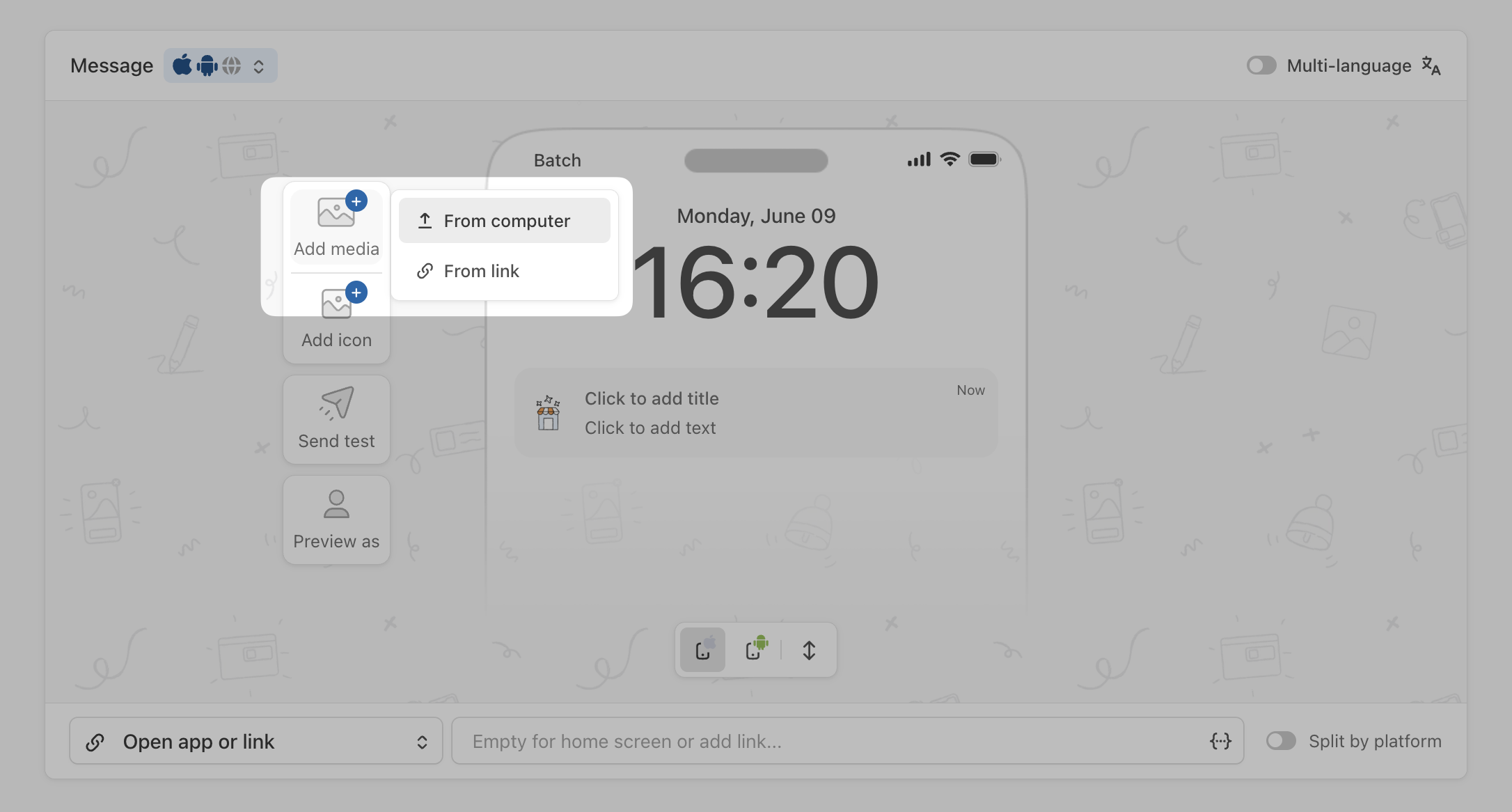
Click "**Add media**" in the message preview:
And choose between these two options:
* **From Computer**: upload a file directly from your computer
* **From link**: upload a URL:
{% hint style="danger" %}
On iOS, you will need to integrate an extension to add support for [rich push notifications](https://doc.batch.com/developer/sdk/ios/sdk-integration/rich-notifications-setup).
{% endhint %}
Here is some information on the supported attachments:
## Image attachment
Batch lets you send large-format notifications with a large image attachment. We require a **landscape image**, PNG or JPG, with a **minimum width of 300px, minimum height of 200px and maximum size of 10MB.**
Images can be displayed on:
* iOS 10+: Make sure you integrated the extension for [rich push notifications](https://doc.batch.com/developer/sdk/ios/sdk-integration/rich-notifications-setup).
* Android 4.1+
* Web: Chrome 56+ on Windows/Android.
## GIF / Audio / Video attachments
{% hint style="danger" %}
These formats **work exclusively on iOS.**
{% endhint %}
### Audio
The file must be an **mp3 file with a valid mime type,** **hosted on an HTTPS server**. The OS will automatically download the mp3 file and drop the download if it takes more than 30 seconds.
### Video
You can add a video attachment using an **mp4 file, with a valid mime type** and **hosted on an HTTPS server**.
{% hint style="info" %}
The video will be downloaded automatically on your users' devices and iOS will drop the download if it takes more than 30 seconds.
{% endhint %}
### GIF
You can also attach a GIF file to your push notification. The GIF file must have a valid mime type and be hosted on an HTTPS server.
## Troubleshooting
If the attachment is not displayed, here are some suggestions to find the issue:
{% stepper %}
{% step %}
### Step 1:
On iOS, make sure you have implemented the additional extension for [rich push notifications](https://doc.batch.com/developer/sdk/ios/sdk-integration/rich-notifications-setup), and check the **deployment target**. If your device's iOS version is below the target, you won't receive an image in your push notification.
[](https://downloads.intercomcdn.com/i/o/149069115/a108ff7f0d235def46f1796f/image.png?expires=1749480300\&signature=5b52af257354d4238764cbdae2ba96075fa56cd6da726fade783a8b2d4b002b2\&req=dSQuFs93nIBaFb4f3HP0gMOm7nl59uTl77ETWrBMAdPm2kfjLUz79Pi0c3rQ%0A4YpVDnYVGpHucZ8%2FEw%3D%3D%0A)
{% endstep %}
{% step %}
### Step 2:
In case you are still facing the same issue, try disabling the energy-saving mode on iOS or Android and retry using a 4G network.
{% endstep %}
{% endstepper %}
---
# Agent Instructions
This documentation is published with GitBook. GitBook is the documentation platform designed so that both humans and AI agents can read, navigate, and reason over technical content effectively. Learn more at gitbook.com.
## Querying This Documentation
If you need additional information that is not directly available in this page, you can query the documentation by asking a question.
Perform an HTTP GET request on the following URL with the `ask` and `goal` query parameters:
```
GET https://doc.batch.com/guides-and-best-practices/message/push-notifications/how-to-attach-an-image-an-audio-a-gif-or-a-video-to-a-push-notification.md?ask=&goal=
```
`ask` is the immediate question: it should be specific, self-contained, and written in natural language.
`goal` is what the user is ultimately trying to achieve, the reason they need the answer. Sharing it helps GitBook give you a better, more relevant answer. A goal is most helpful when it describes the outcome the user wants rather than restating the question. For example, with `ask=how do I create an API token`, a goal like `automate deployments from our CI pipeline` lets GitBook tailor the answer to that use case.
The response will contain a direct answer to the question and relevant excerpts and sources from the documentation.
Use this mechanism when the answer is not explicitly present in the current page, you need clarification or additional context, or you want to retrieve related documentation sections.