# Developer Portal

## **Welcome to Batch's developer portal!**

Here, you’ll find everything you need to integrate with Batch—whether you’re working on the client side using our SDKs, or on the server side with our APIs.

Our resources include high-level usage guides, sample code, and detailed API references to help you get started quickly.

<figure><img src="https://38998153-files.gitbook.io/~/files/v0/b/gitbook-x-prod.appspot.com/o/spaces%2FCL8wF0y1T2vLnm3yR2MW%2Fuploads%2F52zP41JA5HBkumDaMEo7%2FDeveloperHeader.png?alt=media&#x26;token=7427c55d-edd1-4906-b3d4-c6d76c8c22d4" alt=""><figcaption></figcaption></figure>

## Customer Engagement Platform APIs

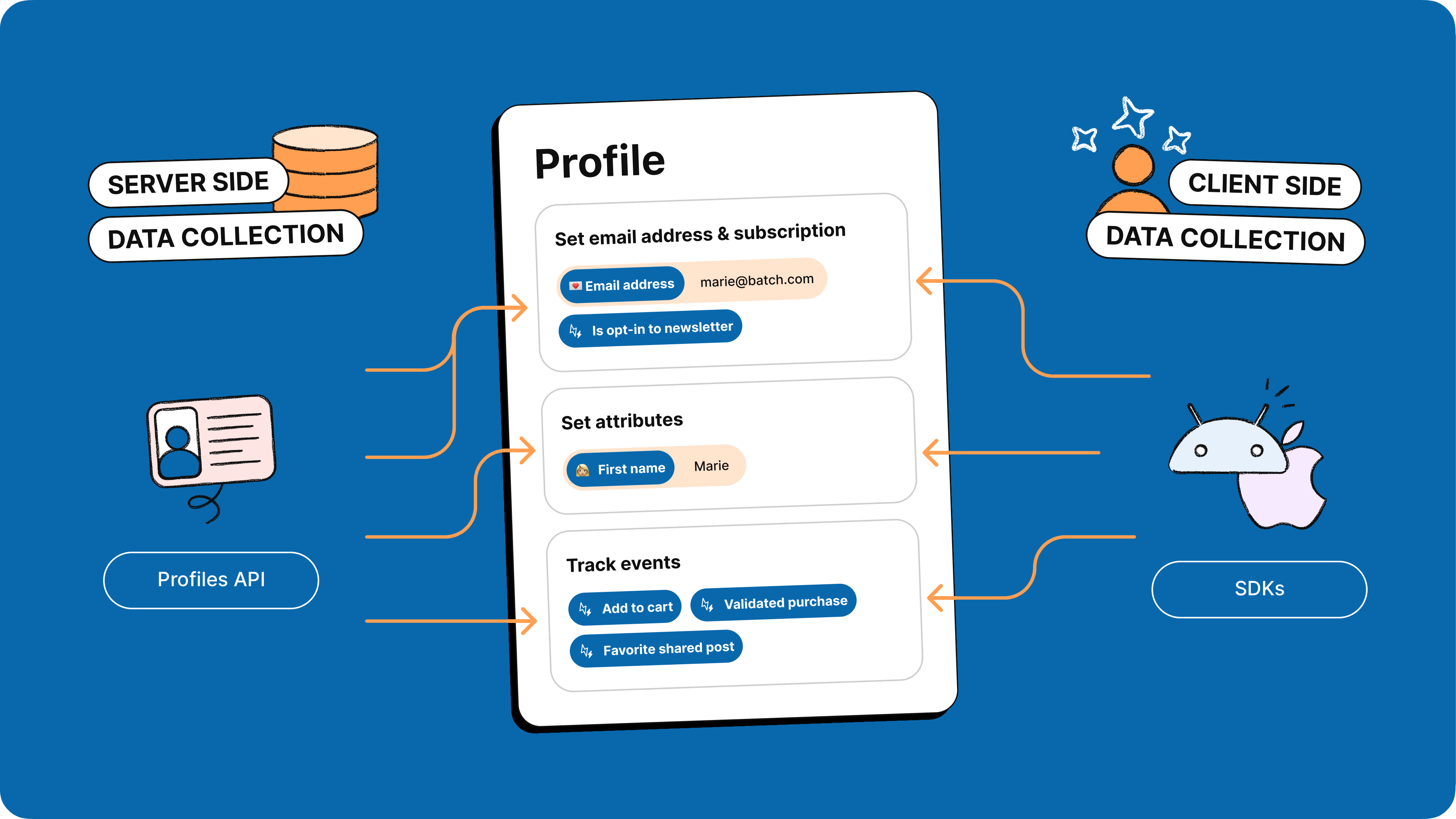
Batch’s Customer Engagement Platform APIs give you server-side access to our new, profile-oriented data model—making it easy to manage and act on user data at scale.

<table data-view="cards"><thead><tr><th></th><th></th><th data-hidden data-card-target data-type="content-ref"></th><th data-hidden data-card-cover data-type="image">Cover image</th></tr></thead><tbody><tr><td>Profiles</td><td>Update or export profile attributes &#x26; events</td><td><a href="api/cep/profiles">profiles</a></td><td><a href="https://38998153-files.gitbook.io/~/files/v0/b/gitbook-x-prod.appspot.com/o/spaces%2FCL8wF0y1T2vLnm3yR2MW%2Fuploads%2FGivkIr5EVCf4Yz5nlv8F%2Fapi_profile.png?alt=media&#x26;token=ccf4ceaa-9e4b-4809-8582-ab17994e9b4e">api_profile.png</a></td></tr><tr><td>Audiences</td><td>Manage and populate audiences</td><td><a href="api/cep/audiences">audiences</a></td><td><a href="https://38998153-files.gitbook.io/~/files/v0/b/gitbook-x-prod.appspot.com/o/spaces%2FCL8wF0y1T2vLnm3yR2MW%2Fuploads%2F9nyHZxx52fxS8lctpusE%2Fapi_audience.png?alt=media&#x26;token=9246d161-fc91-4738-babb-a7a83fbb9854">api_audience.png</a></td></tr><tr><td>Campaigns</td><td>Create omnichannel campaigns</td><td><a href="api/cep/campaigns">campaigns</a></td><td><a href="https://38998153-files.gitbook.io/~/files/v0/b/gitbook-x-prod.appspot.com/o/spaces%2FCL8wF0y1T2vLnm3yR2MW%2Fuploads%2F1GQd5XxX6DkEvehiVCNg%2Fapi_campaigns.png?alt=media&#x26;token=f5c37bac-f0b4-4b96-9b4c-70fc9c1e9863">api_campaigns.png</a></td></tr><tr><td>Exports</td><td>Manage requested exports</td><td><a href="api/cep/exports">exports</a></td><td><a href="https://38998153-files.gitbook.io/~/files/v0/b/gitbook-x-prod.appspot.com/o/spaces%2FCL8wF0y1T2vLnm3yR2MW%2Fuploads%2FdWVkK6NRdFnGhVNwy55D%2Fapi_export.png?alt=media&#x26;token=8ec7b7ab-cee2-4539-9a8d-325bb42b3753">api_export.png</a></td></tr><tr><td>Orchestrations </td><td>List orchestration &#x26; analytics</td><td><a href="api/cep/orchestrations">orchestrations</a></td><td><a href="https://38998153-files.gitbook.io/~/files/v0/b/gitbook-x-prod.appspot.com/o/spaces%2FCL8wF0y1T2vLnm3yR2MW%2Fuploads%2F6h1OUGWHe1s3WgI9Iv4t%2FGemini_Generated_Image_xr4rjrxr4rjrxr4r.png?alt=media&#x26;token=80cde7a8-2cf4-4471-ab13-0f6d7ab36755">Gemini_Generated_Image_xr4rjrxr4rjrxr4r.png</a></td></tr><tr><td>Segments</td><td>List segments</td><td></td><td data-object-fit="cover"><a href="https://38998153-files.gitbook.io/~/files/v0/b/gitbook-x-prod.appspot.com/o/spaces%2FCL8wF0y1T2vLnm3yR2MW%2Fuploads%2FY8DcZwSVvx0JxT1CVYO5%2FGemini_Generated_Image_9kqu909kqu909kqu.png?alt=media&#x26;token=0586800e-8290-4a43-beb9-3968d39e9c37">Gemini_Generated_Image_9kqu909kqu909kqu.png</a></td></tr></tbody></table>

{% content-ref url="api/cep/api-changelog" %}
[api-changelog](https://doc.batch.com/developer/api/cep/api-changelog)
{% endcontent-ref %}

## SDKs

Batch's SDKs bring our features to your app in a developer-friendly API.

### What is an SDK? <a href="#what-is-an-sdk" id="what-is-an-sdk"></a>

"SDK" stands for Software Development Kit.

An SDK is a set of tools developers can use to create apps for a specific platform or to add features to their apps without having to redevelop them from scratch. Apps usually integrate a wide variety of third-party analytics and marketing SDKs.

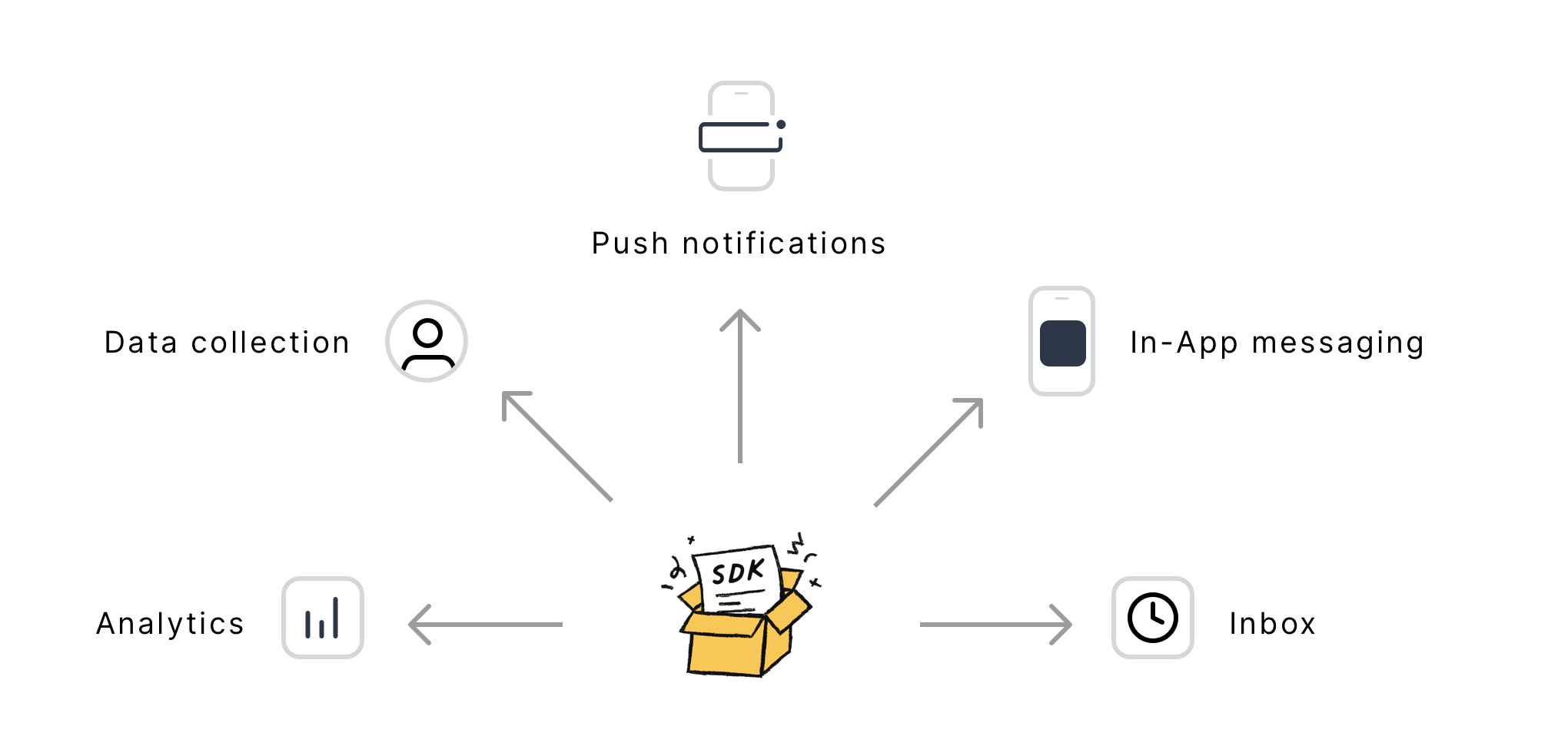
<figure><img src="https://38998153-files.gitbook.io/~/files/v0/b/gitbook-x-prod.appspot.com/o/spaces%2FCL8wF0y1T2vLnm3yR2MW%2Fuploads%2FzzRk54z3CCImxoYkBcOE%2Fsdk_archi.png?alt=media&#x26;token=e1e38c0b-9c45-416b-847c-c57a27530bf6" alt=""><figcaption></figcaption></figure>

Here is a non-exhaustive list of the purposes the SDK serves:

* Analytics: registers new installs, sends app usage data and feedback on push and In-App interactions (e.g. push displayed, opened, In-App message dismissed, etc).
* Data collection: collects and sends Profile data (attributes, events) to Batch servers to improve your segmentation and personalization.
* Push notifications: collects and sends the push token to Batch servers, required to deliver a push to your users' devices. On Android, the receiver included in the SDK is in charge of receiving and displaying the notifications.
* In-App messaging: pulls the list of In-app campaigns matching your users' install from Batch servers and displays the In-app messages.
* Inbox: Provides the history of push notifications sent to the install or the user ID attached to the install. This is useful if you want to add a notification centre to your app.

### Available SDKs and Plugins

<table data-view="cards"><thead><tr><th></th><th data-hidden data-card-target data-type="content-ref"></th></tr></thead><tbody><tr><td>iOS</td><td><a href="sdk/ios">ios</a></td></tr><tr><td>Android</td><td><a href="sdk/android">android</a></td></tr><tr><td>Web</td><td><a href="sdk/web">web</a></td></tr><tr><td>Flutter</td><td><a href="sdk/flutter">flutter</a></td></tr><tr><td>React Native</td><td><a href="sdk/react-native">react-native</a></td></tr><tr><td>Cordova</td><td><a href="sdk/cordova">cordova</a></td></tr></tbody></table>

### SDK Downloads

Most SDKs and Plugins are not to be downloaded directly but integrated by using a package manager: the ones Batch support and how to use the SDK with them is detailed in the "SDK Integration" pages.

You can also find us on [GitHub](https://github.com/BatchLabs) where you will find our SDKs & Plugins source code and sample apps you can use to test our features with.

## Mobile Engagement Platform APIs

<table data-view="cards"><thead><tr><th></th><th data-hidden data-card-target data-type="content-ref"></th></tr></thead><tbody><tr><td>Transactional</td><td><a href="api/mep/transactional">transactional</a></td></tr><tr><td>Campaigns</td><td><a href="api/mep/campaigns">campaigns</a></td></tr><tr><td>In-app Campaigns</td><td><a href="api/mep/in-app-campaigns-api">in-app-campaigns-api</a></td></tr><tr><td>Custom Audience</td><td><a href="api/mep/custom-audience">custom-audience</a></td></tr><tr><td>Custom Data</td><td><a href="api/mep/custom-data-api">custom-data-api</a></td></tr><tr><td>App Data</td><td><a href="api/mep/app-data">app-data</a></td></tr><tr><td>GDPR</td><td><a href="api/mep/gdpr">gdpr</a></td></tr><tr><td>Export</td><td><a href="api/mep/export">export</a></td></tr><tr><td>Webhooks</td><td><a href="api/mep/webhooks">webhooks</a></td></tr><tr><td>Trigger Events</td><td><a href="api/mep/trigger-events-api">trigger-events-api</a></td></tr></tbody></table>