> For the complete documentation index, see [llms.txt](https://doc.batch.com/llms.txt). Markdown versions of documentation pages are available by appending `.md` to page URLs; this page is available as [Markdown](https://doc.batch.com/getting-started/other/implementation-guides/mep-to-cep-migration/how-to-migrate-multiple-websites-into-batch-omnichannel-projects.md).
# How to migrate multiple websites into Batch Omnichannel projects?
As part of the [migration from the Batch MEP to the CEP](https://doc.batch.com/getting-started/other/implementation-guides/how-to-get-ready-to-migrate-from-the-batch-mep-to-the-cep), your mobile apps and websites need to be grouped into **omnichannel projects**. Since each omnichannel project can contain a maximum of **1** Android app, **1** iOS app, and **1** website, you may wonder how to configure your dashboard with multiple websites.
Here is how to set up the Batch dashboard depending on your websites' typology:
## Case A: Independent websites
This case applies when you manage websites that correspond to **different products** (e.g., separate brands or media titles) via separate environments on the Batch MEP dashboard.
👉 In this case, simply request that our team create **one omnichannel project per website**. If there are corresponding mobile apps, they can be included in the respective projects.
## Case B: Variants of the same website
This case applies if you manage websites for the **same product** via separate environments on the Batch MEP dashboard due to a difference in subdomains. The most common case corresponds to country sites managed on different domains (e.g., domain.fr, domain.it, domain.es, etc.).
👉 In this case, we will group all web domains within **a single web environment**, which we will call the **target environment**.
To do so, follow these steps:
{% stepper %}
{% step %}
### **Pre-requisite: Unique Custom User IDs**
* [ ] First, ensure that **the same Custom User ID** is used across the websites you plan to group. If not, the ID will need to be changed in the JavaScript tag (see [step 3](#javascript-tag-implementation)).
{% endstep %}
{% step %}
### **Managing web environments (Batch dashboard)**
* [ ] Choose between these **2 options** to define the target environment:\
\
1\. **Keep an existing web environment**\
Advantage: You can continue addressing a large portion of your opt-in base without interruption if the selected website contains most of the users.\
\
2\. **or Create a new environment (Recommended)**\
Advantage: Greater flexibility for migrating campaigns.\
• You can recreate campaigns as drafts on the new environment and switch over at the right time, instead of having to update all live campaigns.\
• This allows better handling of languages, regions, and translations.\
• This option is also preferable if a change of Custom User ID is required (e.g., when your web and app environments do not share the same Custom User ID).
#### Option 1 steps:
* [ ] Select the website environment that you want to use as the target environment (e.g., domain.fr).
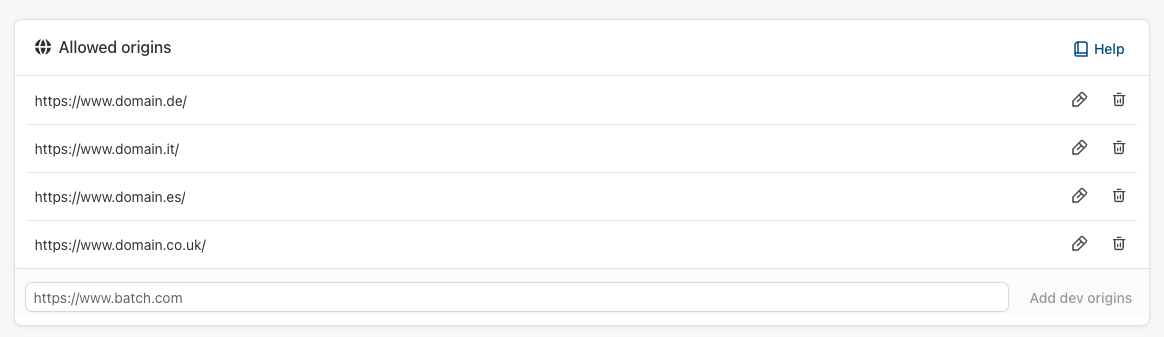
* [ ] Add the secondary domains (e.g., domain.de, domain.it...) under Settings > Push settings > **Allowed origins**:
#### Option 2 steps:
* [ ] Create the target environment by adding a new website to your Batch dashboard (from the left bar, "Add a new app or website).
* [ ] Declare one of your domains (e.g., domain.fr) as the primary domain on this new environment:
* [ ] Add the secondary domains (e.g., domain.de, domain.it...) under Settings > Push settings > **Allowed origins**:
{% hint style="info" %}
At this stage, your Batch contact can already **create the omnichannel project** including the target web environment and the corresponding mobile apps (if there are any).
{% endhint %}
{% endstep %}
{% step %}
### **JavaScript tag implementation**
**Update the Batch JavaScript tag** on all your websites:
* [ ] If your Custom User ID differs between the websites of the project: Update the method to set the [Custom User ID](/developer/sdk/web/profile-data/custom-user-id.md) with the necessary variable.
* [ ] Replace the **SDK API Key**, **Auth Key**, and **VAPID public key**. These keys can be found under Settings > General and Settings > Push settings of the target environment.
* [ ] Modify the [**scope** of the Batch Service Worker](https://doc.batch.com/developer/sdk/web/advanced/declare-path-service-worker#registering-a-service-worker-in-a-sub-scope) (e.g., turn it to `/js/`) on each domain.
* [ ] Unregister the **Service Worker** from the previous scope by adapting the script below to each domain (only required for secondary domains if option 1 was chosen).
```javascript
async function replaceBatchRegistrations() {
if (!("serviceWorker" in navigator)) {
return;
}
// List registered service workers
const currentServiceWorkerRegistrations = await navigator.serviceWorker.getRegistrations();
await currentServiceWorkerRegistrations.forEach( async (registration) => {
if (registration.scope === 'https://www.domain.fr/') { //REPLACE WITH OLD SCOPE
// Found old service worker -> Removing
console.debug("Found old service worker -> Removing")
await registration.unregister()
} else if (registration.scope === 'https://www.domain.fr/js/') { //REPLACE WITH NEW SCOPE
if (!("pushManager" in registration)) {
return;
}
}
})
}
await replaceBatchRegistrations()
```
{% endstep %}
{% step %}
### **Managing orchestrations**
* [ ] Duplicate your existing Web Push automations as drafts in the new environment.
* [ ] \[Optional] Send campaigns from the old environments, encouraging users to revisit the site - this helps accelerate the migration of your user base.
* [ ] Once a sufficient volume of users has migrated to the target environment:
* Deactivate the automations on the **old** environment.
* Activate the automations on the **target** environment.
{% endstep %}
{% endstepper %}
---
# Agent Instructions
This documentation is published with GitBook. GitBook is the documentation platform designed so that both humans and AI agents can read, navigate, and reason over technical content effectively. Learn more at gitbook.com.
## Querying This Documentation
If you need additional information that is not directly available in this page, you can query the documentation by asking a question.
Perform an HTTP GET request on the following URL with the `ask` and `goal` query parameters:
```
GET https://doc.batch.com/getting-started/other/implementation-guides/mep-to-cep-migration/how-to-migrate-multiple-websites-into-batch-omnichannel-projects.md?ask=&goal=
```
`ask` is the immediate question: it should be specific, self-contained, and written in natural language.
`goal` is what the user is ultimately trying to achieve, the reason they need the answer. Sharing it helps GitBook give you a better, more relevant answer. A goal is most helpful when it describes the outcome the user wants rather than restating the question. For example, with `ask=how do I create an API token`, a goal like `automate deployments from our CI pipeline` lets GitBook tailor the answer to that use case.
The response will contain a direct answer to the question and relevant excerpts and sources from the documentation.
Use this mechanism when the answer is not explicitly present in the current page, you need clarification or additional context, or you want to retrieve related documentation sections.