> For the complete documentation index, see [llms.txt](https://doc.batch.com/llms.txt). Markdown versions of documentation pages are available by appending `.md` to page URLs; this page is available as [Markdown](https://doc.batch.com/guides-and-best-practices/message/email/troubleshooting/why-is-gmail-clipping-emails.md).
# Why is Gmail Clipping Emails?
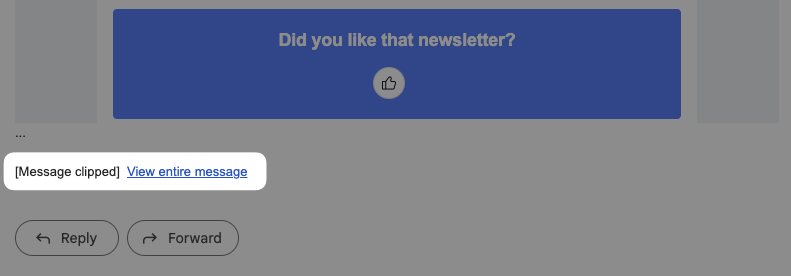
Gmail and some other inbox providers can clip emails that are too long, here is how to troubleshoot your templates.
### About Email Clipping
A clipped email is an email that is not fully displayed in your recipient's inbox. This happens when an email's size **exceeds 102KB**.
Clipped emails are serious because they often hide the footer with the **unsubscribe link**, increasing spam complaints and damaging your short-term sender reputation.
### Troubleshooting Clipped Emails
#### → Email HTML Code Weight
All content adds to the total weight, including:
* Text
* Links
* HTML code (including conditional display code)
{% hint style="warning" %}
Each character uses approximately 1-2KB.
{% endhint %}
#### → Attached Images
Images can be attached to your emails in two different ways:
* **Enclosed images**: Enclosed images are not stored in the template itself. Images are loaded remotely and only the path to the image is referenced in your email template (e.g. ``). This is Batch's default behavior when you create a template from the email composer.
* **Embedded images**: You may also embed an image encoded in Base64 within your HTML template (e.g. ``). Use this approach for small images only, as it adds considerable weight to your template: each Base64 digit represents 6 bits of data. For example, a single 156KB JPEG image will add more than 200K characters to your HTML template.
### Best Practices
1. **Move your unsubscribe link to the top** of long emails to reduce spam complaints
2. **Minimize email size** by:
* Reducing the number and length of links
* Condensing text
* Optimizing HTML code to use fewer characters
---
# Agent Instructions
This documentation is published with GitBook. GitBook is the documentation platform designed so that both humans and AI agents can read, navigate, and reason over technical content effectively. Learn more at gitbook.com.
## Querying This Documentation
If you need additional information that is not directly available in this page, you can query the documentation by asking a question.
Perform an HTTP GET request on the following URL with the `ask` and `goal` query parameters:
```
GET https://doc.batch.com/guides-and-best-practices/message/email/troubleshooting/why-is-gmail-clipping-emails.md?ask=&goal=
```
`ask` is the immediate question: it should be specific, self-contained, and written in natural language.
`goal` is what the user is ultimately trying to achieve, the reason they need the answer. Sharing it helps GitBook give you a better, more relevant answer. A goal is most helpful when it describes the outcome the user wants rather than restating the question. For example, with `ask=how do I create an API token`, a goal like `automate deployments from our CI pipeline` lets GitBook tailor the answer to that use case.
The response will contain a direct answer to the question and relevant excerpts and sources from the documentation.
Use this mechanism when the answer is not explicitly present in the current page, you need clarification or additional context, or you want to retrieve related documentation sections.
 `). This is Batch's default behavior when you create a template from the email composer.
* **Embedded images**: You may also embed an image encoded in Base64 within your HTML template (e.g. `
`). This is Batch's default behavior when you create a template from the email composer.
* **Embedded images**: You may also embed an image encoded in Base64 within your HTML template (e.g. ` `). Use this approach for small images only, as it adds considerable weight to your template: each Base64 digit represents 6 bits of data. For example, a single 156KB JPEG image will add more than 200K characters to your HTML template.
### Best Practices
1. **Move your unsubscribe link to the top** of long emails to reduce spam complaints
2. **Minimize email size** by:
* Reducing the number and length of links
* Condensing text
* Optimizing HTML code to use fewer characters
---
# Agent Instructions
This documentation is published with GitBook. GitBook is the documentation platform designed so that both humans and AI agents can read, navigate, and reason over technical content effectively. Learn more at gitbook.com.
## Querying This Documentation
If you need additional information that is not directly available in this page, you can query the documentation by asking a question.
Perform an HTTP GET request on the following URL with the `ask` and `goal` query parameters:
```
GET https://doc.batch.com/guides-and-best-practices/message/email/troubleshooting/why-is-gmail-clipping-emails.md?ask=
`). Use this approach for small images only, as it adds considerable weight to your template: each Base64 digit represents 6 bits of data. For example, a single 156KB JPEG image will add more than 200K characters to your HTML template.
### Best Practices
1. **Move your unsubscribe link to the top** of long emails to reduce spam complaints
2. **Minimize email size** by:
* Reducing the number and length of links
* Condensing text
* Optimizing HTML code to use fewer characters
---
# Agent Instructions
This documentation is published with GitBook. GitBook is the documentation platform designed so that both humans and AI agents can read, navigate, and reason over technical content effectively. Learn more at gitbook.com.
## Querying This Documentation
If you need additional information that is not directly available in this page, you can query the documentation by asking a question.
Perform an HTTP GET request on the following URL with the `ask` and `goal` query parameters:
```
GET https://doc.batch.com/guides-and-best-practices/message/email/troubleshooting/why-is-gmail-clipping-emails.md?ask=