# How to add an unsubscribe link to your email template?

## Why add an unsubscribe link to your email? <a href="#h_beef1fa82f" id="h_beef1fa82f"></a>

Adding an unsubscribe link to your e-mail marketing campaigns allows Batch to get **instant opt-out feedback** and to not retarget recipients who have chosen to unsubscribe.

Thus, it allows:

* Not to generate dissatisfaction with the recipient who has chosen not to receive e-mail marketing anymore.
* Not to damage the sending reputation.

{% hint style="danger" %}
Unsubscribe links are mandatory in marketing campaigns but **should not be included in transactional campaigns.**
{% endhint %}

Here is an example of an unsubscribe link:

<figure><img src="/files/vwDUUt3Seo1UV5vmA09d" alt=""><figcaption></figcaption></figure>

{% hint style="info" %}
Unsubscribe from an email is recorded when the end user **clicks on the unsubscribe link**. The end user then lands on an unsubscribe confirmation page.
{% endhint %}

## Adding an unsubscribe link to a template via HTML <a href="#h_de458c04a9" id="h_de458c04a9"></a>

Here is how you can simply add an unsubscribe link for an email template in a single language:

```
<a data-msys-unsubscribe="1" data-msys-linkname="batch::unsub" href="[LANDING PAGE LINK]">Unsubscribe</a>
```

If the email template already contains personalization conditions to change the language of certain text blocks, the same should be done for the unsubscribe link:

```
<a data-msys-unsubscribe="1" data-msys-linkname="batch::unsub" {% if b.language == 'fr' %}href="https://static.batch.com/list-management/landing.fr.html"> Se désinscrire {% else %} href="https://static.batch.com/list-management/landing.html"> Unsubscribe {% end %}</a>
```

## Adding an unsubscribe link to a template using the Email composer

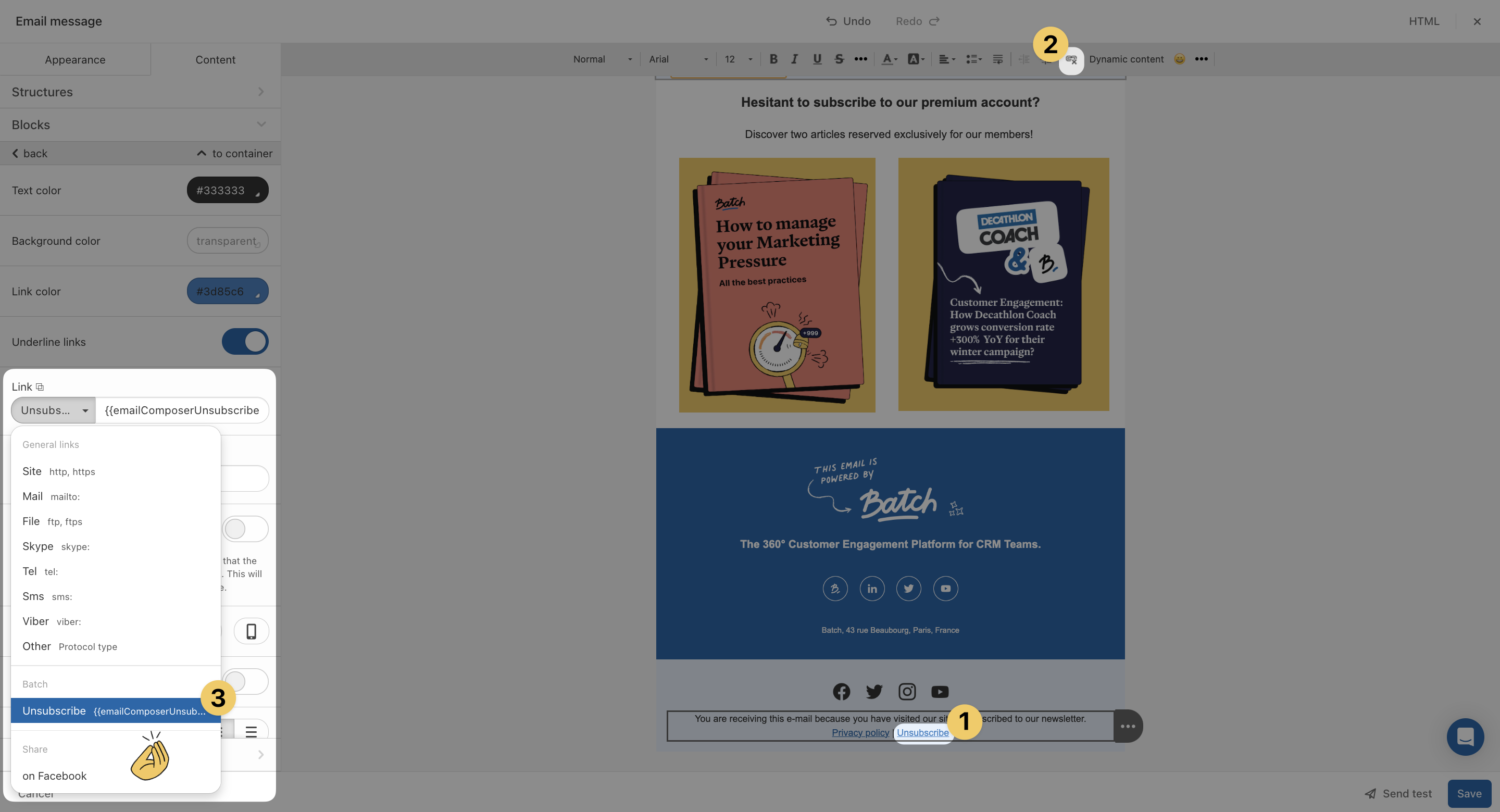
You can also insert an unsubscribe link easily when using the email composer to create your email templates.

To do so:

1. Select the text
2. Add a hyperlink to the text area
3. Select the Unsubscribe option listed in the Link field on the left side panel.

{% hint style="warning" %}
Please note that `{{emailComposerUnsubscribeLink()}}` is **only compatible with the drag and drop email composer**, and should not be used for HTML email creation.
{% endhint %}

<figure><img src="/files/SRTJkoFv6HNATnPH9ix0" alt=""><figcaption></figcaption></figure>

## Choosing a confirmation landing page <a href="#h_2c551c2d00" id="h_2c551c2d00"></a>

Once recipients click on the "unsubscribe" link:

* Batch **removes the recipients** from the marketing mailing list
* Recipients are redirected to a **personalized landing page** hosted on your side

Batch unsubscribe confirmation landing page is localized in FR/DE/ES/EN/IT: when inserting the unsubscribe variable, the landing page will be translated in the end user's browser language.

{% hint style="info" %}
By default, the purpose of this page is to confirm that the user is opt-out of your marketing mailing list. It also gives you a last chance to convince them to stay and continue to receive your content by redirecting them to a preference centre.
{% endhint %}

If you do not have one yet, you can use our default landing page:

* 🇫🇷 French: <https://static.batch.com/list-management/landing.fr.html>
* 🇩🇪 German: <https://static.batch.com/list-management/landing.de.html>
* 🇬🇧 English: <https://static.batch.com/list-management/landing.html>
* 🇪🇸 Spanish: <https://static.batch.com/list-management/landing.es.html>
* 🇮🇹 Italian: <https://static.batch.com/list-management/landing.it.html>


---

# Agent Instructions: Querying This Documentation

If you need additional information that is not directly available in this page, you can query the documentation dynamically by asking a question.

Perform an HTTP GET request on the current page URL with the `ask` query parameter:

```
GET https://doc.batch.com/guides-and-best-practices/message/email/link-and-tracking-settings/how-to-add-an-unsubscribe-link-to-your-email-template.md?ask=<question>
```

The question should be specific, self-contained, and written in natural language.
The response will contain a direct answer to the question and relevant excerpts and sources from the documentation.

Use this mechanism when the answer is not explicitly present in the current page, you need clarification or additional context, or you want to retrieve related documentation sections.
