> For the complete documentation index, see [llms.txt](https://doc.batch.com/llms.txt). Markdown versions of documentation pages are available by appending `.md` to page URLs; this page is available as [Markdown](https://doc.batch.com/guides-and-best-practices/email-deliverability/email-authentication-and-sending-structure/email-authentication-spf-dkim-dmarc-and-bimi.md).
# Email Authentication (SPF, DKIM, DMARC & BIMI)
Know more on Batch default setup for SPF, DKIM, DMARC, MX and BIMI.
## About Email Authentication
Email authentication is the first aspect senders should consider when they start sending emails. **Email authentication is required by mailbox providers**, and crucial for verifying sender identity and minimizing email spoofing risks.
When sending emails, ensure you have correctly implemented the following technical measures:
* Sender Policy Framework (SPF)
* DomainKeys Identified Mail (DKIM)
* Domain-based Message Authentication, Reporting, and Conformance (DMARC)
While this is not related to email authentication, we also recommend implementing:
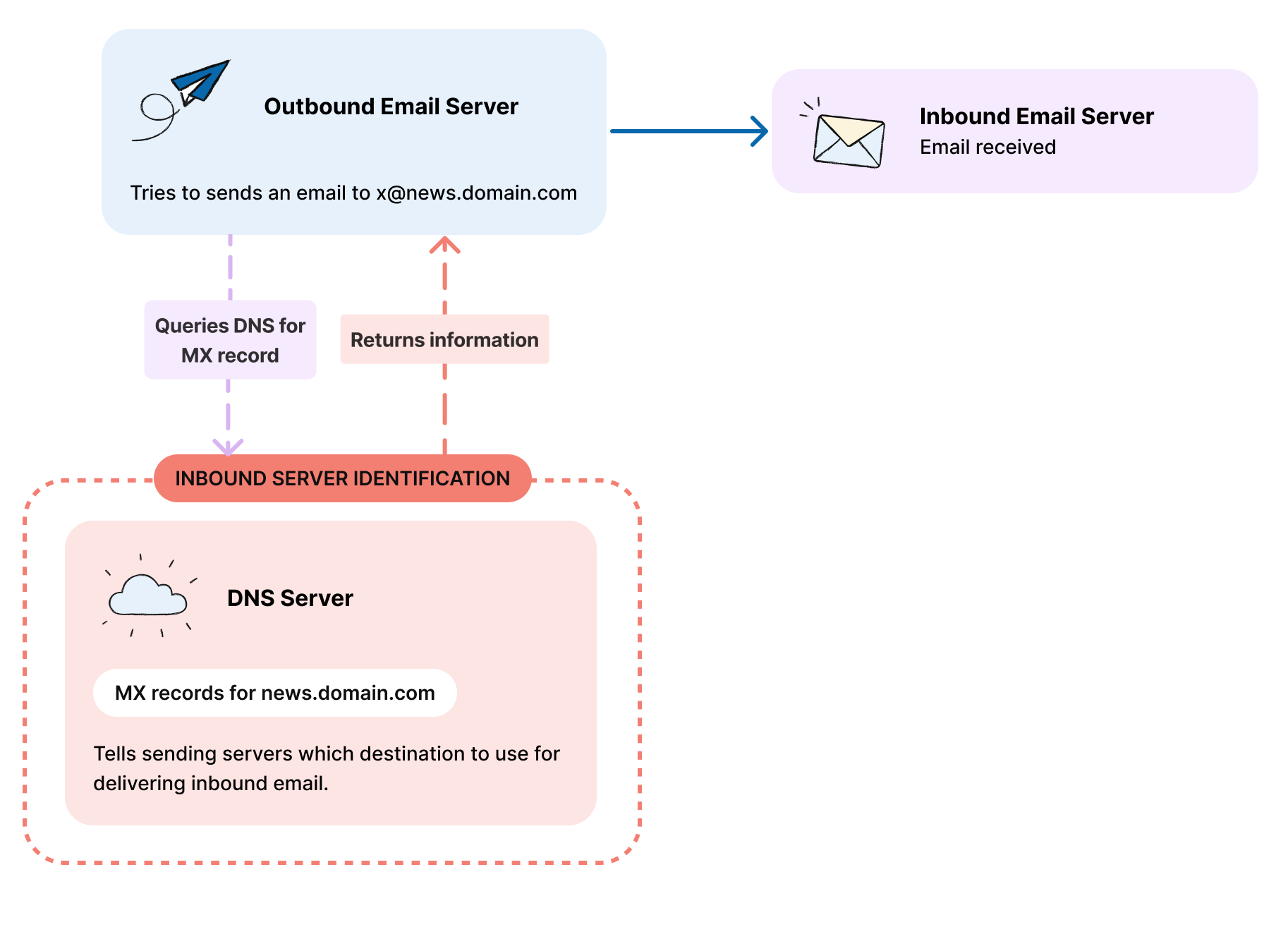
* MX records, to specify the servers responsible for receiving email
* Brand Indicators for Message Identification (BIMI)
{% hint style="info" %}
As part of Batch default implementation, every sender must use SPF, DKIM and DMARC.
{% endhint %}
## Email Security & Transport
All emails sent through Batch are transmitted using **TLS (Transport Layer Security) encryption.**
This means your email content are automatically protected with industry-standard encryption while traveling between servers, safeguarding your communications from interception.
{% hint style="info" %}
**TLS is enabled by default** and requires no additional configuration on your part. Your emails are secured from the moment they leave our platform.
{% endhint %}
## Sender Policy Framework (SPF)
SPF is used for sending IP validation. SPF is designed to stop spammers from sending emails that falsely appear to come from your domain.
To implement SPF, you need to create and publish an SPF record for your domain, listing all authorized email servers.
## DomainKeys Identified Mail (DKIM)
DKIM enables inbox providers to verify the email is authentic and hasn't been modified during the delivery.
DKIM is an email authentication method that helps protect against email spoofing and phishing attacks. It allows an organization to verify the authenticity of an email message, enabling recipients to confirm that the message was indeed sent by the domain owner.
{% hint style="info" %}
Batch uses by default a 2048-bit DKIM key and DKIM over-signing. Our team can generate a stronger DKIM key upon request.
{% endhint %}
## Domain-based Message Authentication, Reporting, and Conformance (DMARC)
DMARC helps prevent email spoofing and phishing by allowing domain owners to set policies that dictate how receiving servers should manage emails that fail SPF or DKIM checks, such as quarantining or rejecting them.
Additionally, DMARC provides domain owners with reports on email delivery and authentication, aiding in the monitoring and enhancement of email security.
{% hint style="info" %}
We strongly recommend you set up **DMARC reports**. This will allow you to monitor emails sent using your domain and to identify senders trying to impersonate your domain.
{% endhint %}
## Optional Setup
### → Specify the Servers Responsible for Receiving Email
Some inbox providers may require the presence of a **Mail Exchange (MX)** record to accept emails. An MX record is a type of DNS record that specifies the mail servers **responsible for receiving email messages** on behalf of a domain.
You can use the MX records Batch implementation team provides by default as part of the onboarding process, or use your own if you want to process the responses in a specific tool you are already using (e.g., a ticketing tool, etc.).
#### → Brand Indicators for Message Identification (BIMI)
[Brand Indicators for Message Identification (BIMI)](https://bimigroup.org/) is an email specification that allows authenticated senders to display their logos within supporting email clients, improving brand recognition.
BIMI adds value for brands that want to stand out in the recipient's inbox or that are more likely to be targeted by phishing campaigns (e.g., finance, insurance, etc.). Note that BIMI implementation is optional and not all email providers currently support it.
{% hint style="info" %}
Implementing BIMI is possible with Batch. It requires additional costs to get a renewable Verified Mark Certificate.
{% endhint %}
---
# Agent Instructions
This documentation is published with GitBook. GitBook is the documentation platform designed so that both humans and AI agents can read, navigate, and reason over technical content effectively. Learn more at gitbook.com.
## Querying This Documentation
If you need additional information that is not directly available in this page, you can query the documentation by asking a question.
Perform an HTTP GET request on the following URL with the `ask` and `goal` query parameters:
```
GET https://doc.batch.com/guides-and-best-practices/email-deliverability/email-authentication-and-sending-structure/email-authentication-spf-dkim-dmarc-and-bimi.md?ask=&goal=
```
`ask` is the immediate question: it should be specific, self-contained, and written in natural language.
`goal` is what the user is ultimately trying to achieve, the reason they need the answer. Sharing it helps GitBook give you a better, more relevant answer. A goal is most helpful when it describes the outcome the user wants rather than restating the question. For example, with `ask=how do I create an API token`, a goal like `automate deployments from our CI pipeline` lets GitBook tailor the answer to that use case.
The response will contain a direct answer to the question and relevant excerpts and sources from the documentation.
Use this mechanism when the answer is not explicitly present in the current page, you need clarification or additional context, or you want to retrieve related documentation sections.