> For the complete documentation index, see [llms.txt](https://doc.batch.com/llms.txt). Markdown versions of documentation pages are available by appending `.md` to page URLs; this page is available as [Markdown](https://doc.batch.com/getting-started/features/mobile-engagement-platform/analytics/audience.md).
# Audience
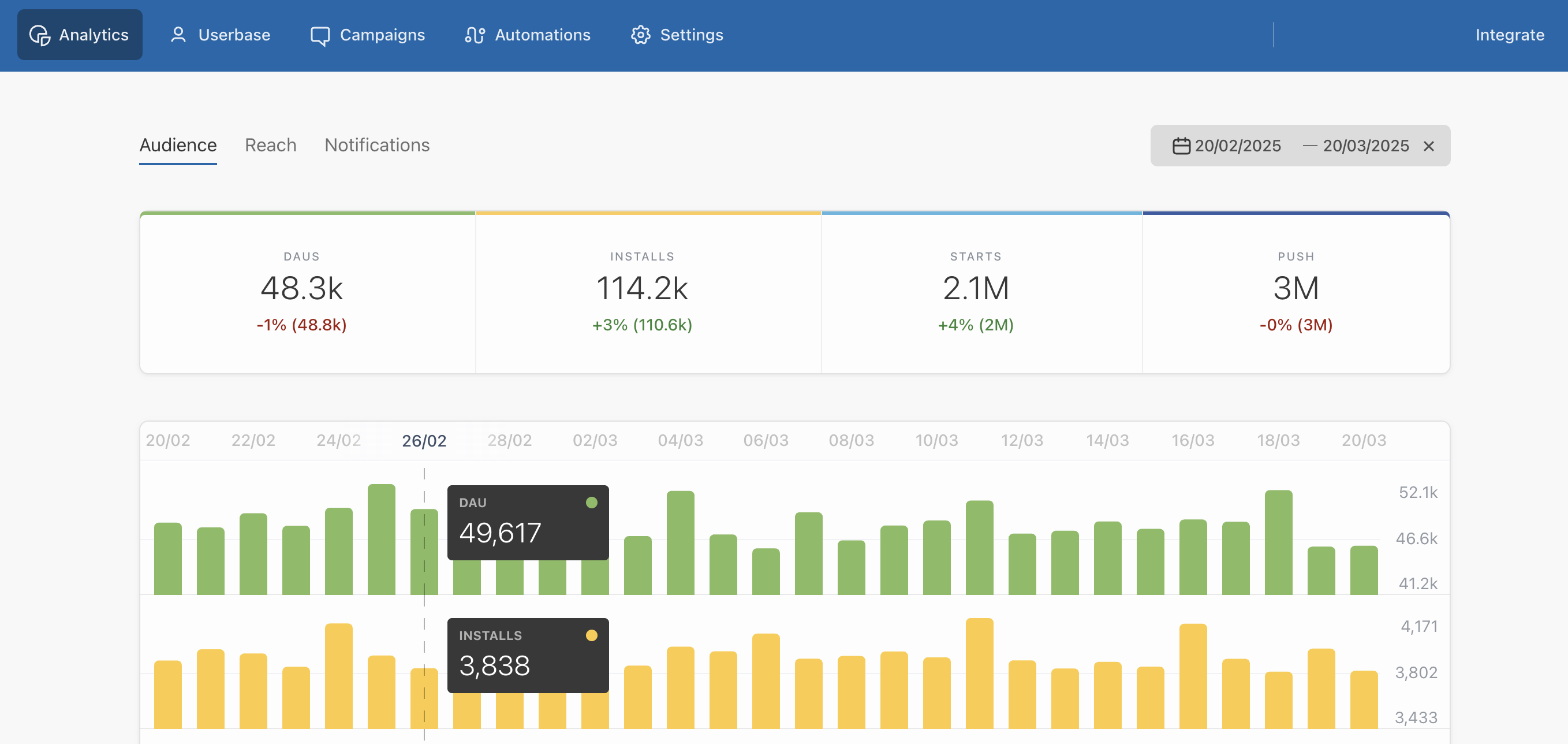
The **Audience** tab is the first screen you see when you click on the *Analytics* tab. It shows five basic metrics: Daily Active Users *(DAU)*, installs, starts, push and redeems.
These indicators are updated **on a 24h basis**.
## Selecting a date range
By default, the dashboard displays **one month** of data for the app you've selected. You can choose a custom date range in the date picker.
Batch can also show you the number of installs an app receives **hourly** *(UTC)*. All you need to do is select a time period *(no greater than 3 days)* in the date picker. This is a great way to find out at what times during the day your users are the most receptive.
Additionally, you can see how your userbase is distributed around the world in order to optimize your marketing strategies or decide in **which language** you should localize your next push notification.
The counters per region displayed on the map are calculated based on the data collected at the first application start. If the user's region changes overtime or is overwritten, the counters will remain unchanged.
## Interpreting your statistics
There are **5 metrics** you should check daily to see how your app is performing over time and measure the impact of your push campaigns:
**DAUS**
*"AVG DAUs"* stands for average number of **Daily Active Users**. It's a basic metric that shows the average number of users who open your app on a daily basis.
Pay attention to the evolution of your app's DAUs. They're a good indicator for seeing if the **involvement of your users** is increasing or if you need to send a push notification to re-engage them.
The **DAUs/Installs ratio** is also a basic indicator to measure the ‘stickiness’ of your app. Depending on the category of your app, this ratio can vary between 15% or 30%.
**Installs**
Number of new installs over a period of time. Updates and reinstalls are considered as new installs.
Bear in mind that users coming from an older version of your app and upgrading to a version with Batch's SDK *(after a first release or a token import)* are considered as new installs.
**Starts**
Number of times the SDK *"starts"* in your app over a period of time. The SDK starts every time a user opens your app.
The starts/DAUs ratio can help you to measure the average number of sessions initiated by your users.
**Push**
Total number of marketing and transactional push notifications sent over a period of time. Click on the [Notifications tab](/getting-started/features/mobile-engagement-platform/analytics/notifications.md) if you want to see a full report on your push strategy *(global open-rate, global re-engage rate, etc)*.
**Revenue**
Income generated in your app. Make sure you are sending custom data on transactions to see this indicator.
**Uninstalls**
Number of invalid tokens deleted daily, based on the feedback received from the platform push services (e.g. APNS on iOS, FCM on Android, etc). Tokens are considered invalid when users uninstall the app or clear your website data (web push notifications only). Batch receives these feedback every time a token is targeted by a push campaign. You may notice an increased number of uninstalls on days when you send many campaigns, as Batch will receive more feedback from the push services.
**Rolling MAU**
*"MAU"* stands for **Monthly Active Users**. It shows the number of users who opened your app at least once in the last 30 days.
---
# Agent Instructions
This documentation is published with GitBook. GitBook is the documentation platform designed so that both humans and AI agents can read, navigate, and reason over technical content effectively. Learn more at gitbook.com.
## Querying This Documentation
If you need additional information that is not directly available in this page, you can query the documentation by asking a question.
Perform an HTTP GET request on the following URL with the `ask` and `goal` query parameters:
```
GET https://doc.batch.com/getting-started/features/mobile-engagement-platform/analytics/audience.md?ask=&goal=
```
`ask` is the immediate question: it should be specific, self-contained, and written in natural language.
`goal` is what the user is ultimately trying to achieve, the reason they need the answer. Sharing it helps GitBook give you a better, more relevant answer. A goal is most helpful when it describes the outcome the user wants rather than restating the question. For example, with `ask=how do I create an API token`, a goal like `automate deployments from our CI pipeline` lets GitBook tailor the answer to that use case.
The response will contain a direct answer to the question and relevant excerpts and sources from the documentation.
Use this mechanism when the answer is not explicitly present in the current page, you need clarification or additional context, or you want to retrieve related documentation sections.