> For the complete documentation index, see [llms.txt](https://doc.batch.com/llms.txt). Markdown versions of documentation pages are available by appending `.md` to page URLs; this page is available as [Markdown](https://doc.batch.com/getting-started/features/customer-engagement-platform/analytics/profile-analytics.md).
# Profile Analytics
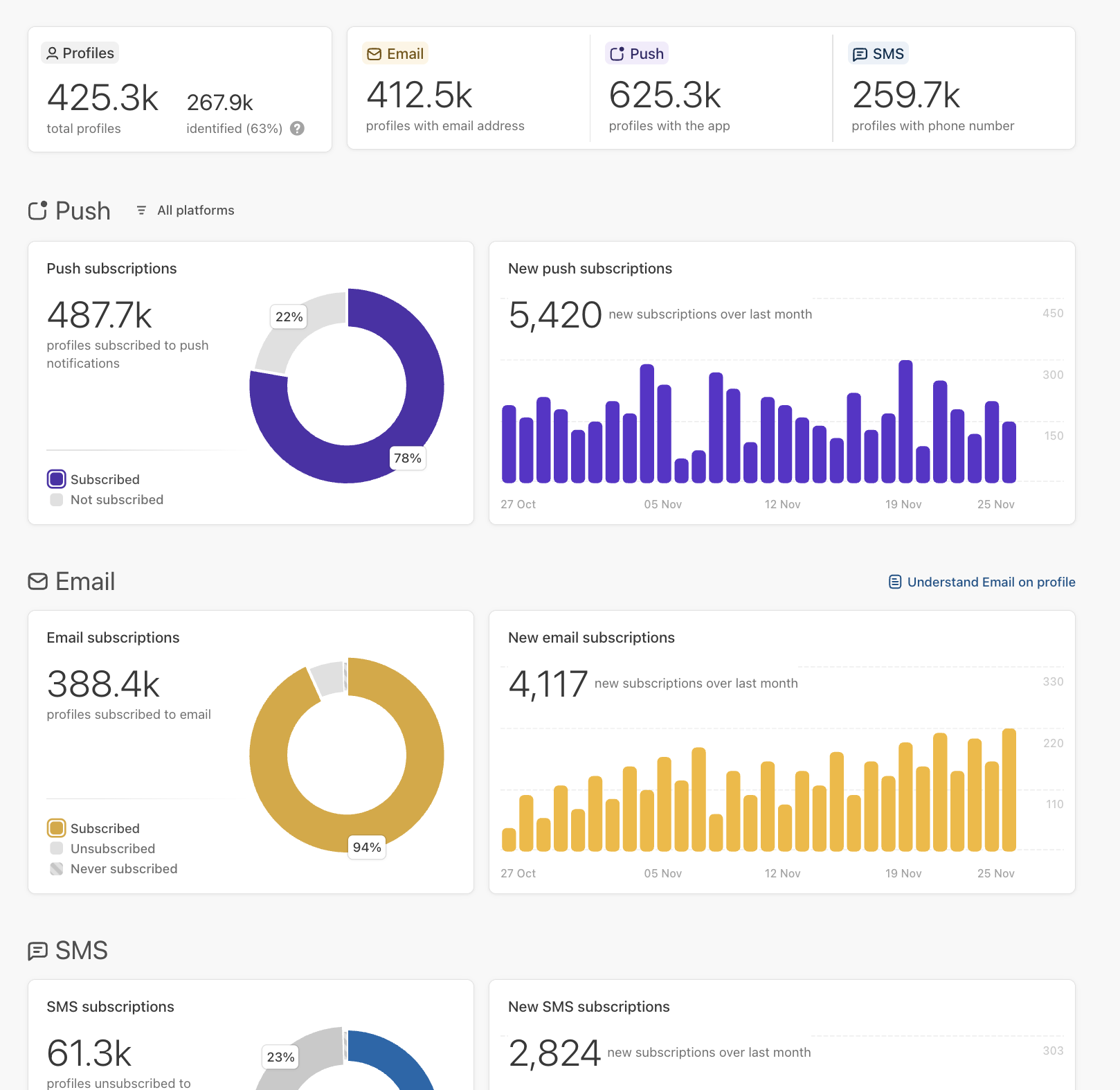
This page provides an overview of the profiles in Batch. It shows how many have an email address, a mobile app/web, or a phone number attached for example.
## Header
**Total of profiles:** Profiles centralize data and events gathered from various sources such as apps, websites, and APIs. They can either be logged-in or anonymous, reachable via email or not. Profiles are automatically generated when a user first engages with your app, visits your website, or if you send data using a Custom ID via API.
**Identified profiles:** Profiles that have a Custom ID, usually shared after login or sign-in.
**Anonymous profiles:** Profiles that didn't log in to their customer accounts yet. Anonymous profiles are automatically generated by Batch when a user visits your app or website and you don't know how to recognize them yet.
## Activity
This section tracks how your app base evolves over time and how actively your profiles engage with your app or website. You can filter it by date range (up to 1 year) and by platform — when no platform is selected, counts are summed across all platforms.
{% hint style="info" %}
New installs and Uninstalls are only available for iOS and Android; Website is not covered. Daily Active Profiles, Rolling Active Profiles and Starts are available across iOS, Android and Website.
{% endhint %}
### New installs
This bar chart illustrates the daily number of new app installs over the selected period. An install is counted the first time Batch detects a new app installation, independently of whether the user has enabled push notifications.
### Uninstalls
This bar chart illustrates the daily number of app uninstalls over the selected period. An uninstall is counted when Batch receives an uninstall notification from Apple (APNs) or Google (FCM) following a push delivery attempt.
{% hint style="info" %}
Account deletions (for example following a GDPR request) or clean-ups of inactive profiles are not counted as uninstalls here — only uninstalls detected via push delivery feedback are included.
{% endhint %}
{% hint style="warning" %}
Data is available from July 2026 onward. There is no historical data for installs and uninstalls prior to that date.
{% endhint %}
### Daily Active Profiles
This bar chart illustrates, for each day in the selected period, the number of distinct Profiles that triggered at least one start of the Batch SDK (excluding silent starts) on a device — iOS, Android or Website. A Profile starting several times on the same day is only counted once for that day.
Filtering by a platform (iOS, Android or Website) counts a Profile only if it started on that specific platform that day — not simply if the Profile was active overall. A Profile active on several platforms the same day is counted in each platform's filtered view, but still only once in the unfiltered (all platforms) view.
### Rolling Active Profiles
This chart shows, for each day in the selected period, the number of distinct Profiles that triggered at least one start of the Batch SDK at some point over the preceding 30 days — a rolling 30-day window, recomputed daily — across iOS, Android and Website.
As with Daily Active Profiles, filtering by a platform counts only Profiles that started on that specific platform at least once during the 30-day window — a Profile that only started on another platform during that window is excluded from the filtered view.
### Starts
This bar chart illustrates the total number of Batch SDK starts (excluding silent starts) recorded per day, across iOS, Android and Website. Unlike Daily Active Profiles, this metric is not deduplicated: a Profile starting the app several times on the same day is counted once per start.
{% hint style="warning" %}
Data is available from September 17, 2026 onward. There is no historical data for Daily Active Profiles, Rolling Active Profiles or Starts prior to that date. Because Rolling Active Profiles is computed over a rolling 30-day window, values shown before October 17, 2026 reflect a partial window (fewer than 30 days of underlying data).
{% endhint %}
## Push
You can filter the push section to access specific information about iOS, Android, or Web push subscritpions.
### Push subscriptions
This sections provides a breakdown of profiles that are subscribed and not subscribed to push notifications, based on the total number of profiles eligible for push notification subscriptions. For example, when filtering for iOS push notifications, you would only consider profiles that have the iOS app installed.
### New subscriptions
This bar chart illustrates the daily count of new push notification subscriptions over the past 30 days. It exclusively shows new sign-ups and does not reflect any unsubscriptions that occurred during the same timeframe.
## Email
### Email subscriptions
This section provides a breakdown of profiles according to their marketing email subscription status, based on the total number of profiles with an email address.
**Subscribed**: Subscribed profiles have explicitly given their consent to receive marketing emails. You can send them both transactional and marketing emails.
**Unsubscribed**: Unsubscribed profiles have opted out of receiving marketing emails. Unsubscriptions are automatically tracked when a user clicks on an unsubscribe link in your email. You can also manage unsubscribed profiles through the Profile API, for instance, if a user unsubscribes from a preference center in your app. You can send them transactional emails only.
**Never subscribed**: Never subscribed profiles have shared an email address with you, such as during the creation of a user account, but they did not subscribe to marketing emails. You can send them transactional emails only. It's also possible to reset a profile email subscription status to "Never Subscribed" using the Profile API.
### New email subscriptions
This bar chart illustrates the daily count of new email marketing subscriptions over the past 30 days. It exclusively shows new sign-ups and does not reflect any unsubscriptions that occurred during the same timeframe.
## SMS
This section provides a breakdown of profiles according to their marketing SMS subscription status, based on the total number of profiles with a phone number.
**Subscribed**: Subscribed profiles have explicitly given their consent to receive marketing SMS. You can send them both transactional and marketing SMS.
**Unsubscribed**: Unsubscribed profiles have opted out of receiving marketing SMS. Unsubscriptions are automatically tracked when a user unsubscribes from SMS using a STOP code. You can also manage unsubscribed profiles through the Profile API, for instance, if a user unsubscribes from a preference center in your app. You can send them transactional SMS only.
**Never subscribed**: Never subscribed profiles have shared a phone number with you, such as during the creation of a user account, but they did not subscribe to marketing SMS. You can send them transactional SMS only. It's also possible to reset a profile SMS subscription status to "Never Subscribed" using the Profile API.
{% hint style="warning" %}
Profiles are powering Push v2, email and SMS channels. Push v1 is powered by an installation based data model, siloed by platform (iOS, Android, Web).
{% endhint %}
---
# Agent Instructions
This documentation is published with GitBook. GitBook is the documentation platform designed so that both humans and AI agents can read, navigate, and reason over technical content effectively. Learn more at gitbook.com.
## Querying This Documentation
If you need additional information that is not directly available in this page, you can query the documentation by asking a question.
Perform an HTTP GET request on the following URL with the `ask` and `goal` query parameters:
```
GET https://doc.batch.com/getting-started/features/customer-engagement-platform/analytics/profile-analytics.md?ask=&goal=
```
`ask` is the immediate question: it should be specific, self-contained, and written in natural language.
`goal` is what the user is ultimately trying to achieve, the reason they need the answer. Sharing it helps GitBook give you a better, more relevant answer. A goal is most helpful when it describes the outcome the user wants rather than restating the question. For example, with `ask=how do I create an API token`, a goal like `automate deployments from our CI pipeline` lets GitBook tailor the answer to that use case.
The response will contain a direct answer to the question and relevant excerpts and sources from the documentation.
Use this mechanism when the answer is not explicitly present in the current page, you need clarification or additional context, or you want to retrieve related documentation sections.