# POST - Track events

The Trigger Events API allows you to track events on specific Custom User IDs. These events can be used as trigger and cancellation events of trigger automations.

Tracking server side events is particularly useful for actions performed outside of the app (e.g. purchase, subscription, updated profile, etc).

### Request structure

The events endpoint allows you to **track events** either for one user, or for multiple users.

#### Route

The Trigger Events API exposes two POST endpoints:

* `https://api.batch.com/1.0/BATCH_API_KEY/events/users/CUSTOM_USER_ID` for a single upload (send one or multiple events on a single Custom User ID)
* `https://api.batch.com/1.0/BATCH_API_KEY/events/users` for bulk upload (send one or multiple events on different Custom User IDs)

**NOTE**: `CUSTOM_USER_ID` is a Custom User ID as described [here](https://doc.batch.com/developer/sdk/ios/profile-data/custom-user-id) for iOS and [here](https://doc.batch.com/developer/sdk/android/profile-data/custom-user-id) for Android.

Bulk updates allow you to track events for multiple users with one API call.

Here are two valid cURL examples.

**Single upload**

You can track up to 1000 events for a single Custom User ID.

```bash
curl -H "Content-Type: application/json" -H "X-Authorization: BATCH_REST_API_KEY" -X POST -d "@payload.json" "https://api.batch.com/1.0/BATCH_API_KEY/events/users/CUSTOM_USER_ID"
```

**Bulk upload**

You can track up to 1000 events, distributed amongst several Custom User IDs.

```bash
curl -H "Content-Type: application/json" -H "X-Authorization: BATCH_REST_API_KEY" -X POST -d "@payload.json" "https://api.batch.com/1.0/BATCH_API_KEY/events/users"
```

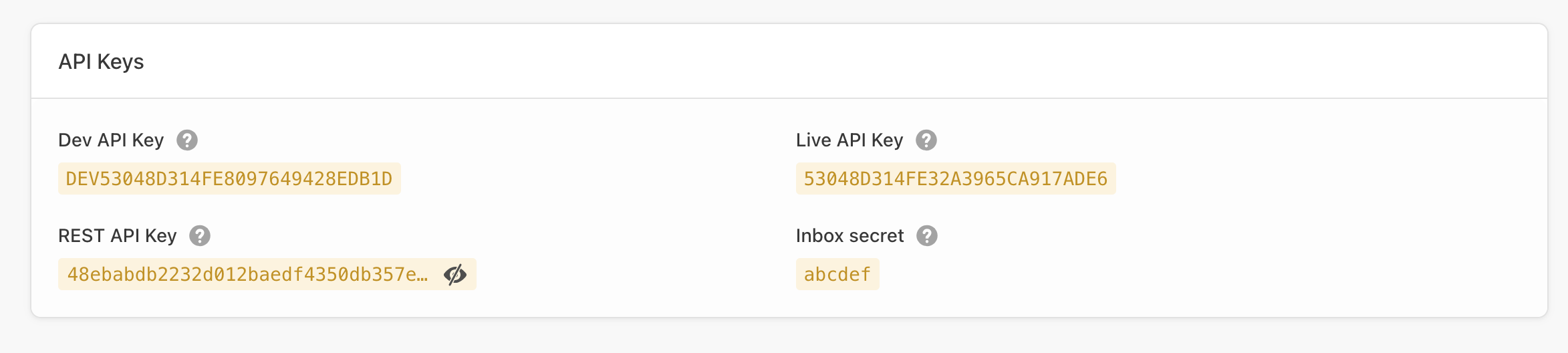
The `BATCH_API_KEY` value is either your **Live**, **Dev** or **SDK** Batch API key from the settings page of your app within the dashboard *(Settings → General)*:

<figure><img src="https://38998153-files.gitbook.io/~/files/v0/b/gitbook-x-prod.appspot.com/o/spaces%2FCL8wF0y1T2vLnm3yR2MW%2Fuploads%2FaKvwGwx5BlMoDlIyfy14%2Fimage.png?alt=media&#x26;token=2fbbc2c7-3e5d-438a-8957-be8115e8e35e" alt=""><figcaption></figcaption></figure>

> Please note Batch manages each platform separately, so you will have to call the API twice with a different API key if you want to target iOS and Android.

#### Headers

In order to authenticate with the API, you need to provide your **company REST API Key** as the value of the `X-Authorization` header. You can find it in ⚙ Settings → General.

> **Insufficient privileges issue**: You may see that error in the REST API key field. This happens because the REST API key is only visible to managers. Make sure the managers of the account in a secure way that key with you or ask them to grant you access through the team manager.

#### Single upload

For a single upload, the body of the request must contain an **valid JSON payload** describing the event(s) you want to attach to a user's profile.

Here is a how a valid JSON payload looks like:

```json
{
  "events": [
    {
      "name": "ue.added_to_cart",
      "time": "2012-08-12T22:30:05",
      "label": "shoes",
      "attributes": {
        "id": "00-00-xxx-xxx",
        "sub_category": "boots",
        "date(promo_ends)": "2021-08-12T22:30:05"
      },
      "tags": [
        "private-sales",
        "summer-discount"
      ]
    }
  ]
}
```

Let's see the parameters in detail.

<table><thead><tr><th width="147.5">Id</th><th>Description</th></tr></thead><tbody><tr><td><code>events</code></td><td><strong>Array</strong> - <em>Required</em><br>Array of event objects.<br><a href="../parameters#the-event-object">See Event object</a> .<br><em>E.g.</em><code>{"events":[{"name":"ue.added_to_cart"}]}</code></td></tr></tbody></table>

#### Bulk tracking

Bulk tracking works basically the same way as a single upload, except now you need to provide an array with Custom User IDs and list of events you want to attach to their profiles.

Here is a how a valid JSON payload looks like:

```json
[
  {
    "id": "vincent",
    "events": [
      {
        "name": "ue.added_to_cart",
        "time": "2012-08-12T22:30:05",
        "label": "shoes",
        "attributes": {
          "id": "00-00-xxx-xxx",
          "sub_category": "boots",
          "date(promo_ends)": "2021-08-12T22:30:05"
        },
        "tags": [
          "private-sales",
          "summer-discount"
        ]
      }
    ]
  },
  {
    "id": "claire",
    "events": [
      {
        "name": "ue.added_to_cart",
        "time": "2012-08-12T22:30:05",
        "label": "glasses",
        "attributes": {
          "id": "00-00-yyy-yyy",
          "sub_category": "accessories",
          "date(promo_ends)": "2021-08-12T22:30:05"
        },
        "tags": [
          "private-sales",
          "summer-discount"
        ]
      }
    ]
  }
]
```

<table><thead><tr><th width="109">Id</th><th>Description</th></tr></thead><tbody><tr><td><code>id</code></td><td><strong>string</strong> - <em>Required</em><br>User's Custom User ID.<br><em>E.g.</em><code>{"id":"Vincent"}</code></td></tr><tr><td><code>events</code></td><td><strong>Array</strong> - <em>Required</em><br>Array of event objects.<br><a href="../parameters#the-event-object">See Event object</a> .<br><em>E.g.</em><code>{"events":[{"name":"ue.added_to_cart"}]}</code></td></tr></tbody></table>

### Responses

#### Success

If the POST to the API endpoint is successful you will receive an **HTTP 201** confirmation and **a unique token** reprensenting the transaction.

```json
{ "token": "110e8400-e29b-11d4-b543-446655440000" }
```

Please keep this token: it will help in getting faster support.

#### Failure

If the POST data does not meet the API requirements you will receive an actionable error message. Contact us at <support@batch.com> if you need further support.

* `AUTHENTICATION_INVALID` (Http status code: 401, Error code: 10)
* `API_MISUSE` (Http status code: 403, Error code: 12)
* `ROUTE_NOT_FOUND` (Http status code: 404, Error code: 20)
* `MISSING_PARAMETER` (Http status code: 400, Error code: 30)
* `MALFORMED_PARAMETER` (Http status code: 400, Error code: 31)
* `MALFORMED_JSON_BODY` (Http status code: 400, Error code: 32)
* `SERVER_ERROR` (Http status code: 500, Error code: 1)
* `MAINTENANCE_ERROR` (Http status code: 503, Error code: 2)
* `TOO_MANY_REQUESTS`(Http status code: 429, Error code: 60)

**Important:** If you get a `TOO_MANY_REQUESTS` response, please wait for at least 5 seconds before trying again. Further requests might still return this error.
