> For the complete documentation index, see [llms.txt](https://doc.batch.com/llms.txt). Markdown versions of documentation pages are available by appending `.md` to page URLs; this page is available as [Markdown](https://doc.batch.com/developer/api/mep/in-app-campaigns-api/create.md).
# POST - Create In-App campaign
The In-App Campaigns API is made for creating, reviewing, listing, updating and deleting In-App campaigns.
The structure of this API is very similar to the Campaigns API. Before sending your first campaign, you have to create at least one theme on the In-app theme editor and retrieve its code.
### Request structure
The create endpoint allows you to create In-App campaigns and reach all your userbase, opt-in to notifications or not. You can also use native and custom attributes as well as Custom Audiences for your targeting.
#### Route
The in-app campaigns API exposes a POST create endpoint at: `https://api.batch.com/1.1/BATCH_API_KEY/in-app-campaigns/create`
Here are examples of valid cURL, PHP or Python requests syntax:
{% tabs %}
{% tab title="cURL" %}
```bash
curl -X POST "https://api.batch.com/1.1/BATCH_API_KEY/in-app-campaigns/create" \
-H "Content-Type: application/json" \
-H "X-Authorization: BATCH_REST_API_KEY" \
-d '{
"name": "Test Campaign",
"local_start_date": "2017-06-01T14:00:00",
"live": true,
"trigger": {
"capping": 1,
"when": "NEXT_SESSION"
},
"landing": {
"theme": "HELLO-THEME",
"image": "https://static.batch.com/documentation/logo_batch_192.png",
"contents": [
{
"language": "en",
"header": "Welcome",
"title": "Hello!",
"body": "How is it going?",
"actions": [
{
"label": "Continue",
"action": "continue"
}
]
}
]
}
}'
```
{% endtab %}
{% tab title="PHP" %}
```php
use GuzzleHttp\Client;
$client = new Client();
$response = $client->request("POST", "https://api.batch.com/1.1/BATCH_API_KEY/in-app-campaigns/create", [
"headers" => [
"Content-Type" => "application/json",
"X-Authorization" => "BATCH_REST_API_KEY"
],
"json" => [
"name" => "Test Campaign",
"live" => true,
"trigger" => [
"capping" => 1,
"when" => "NEXT_SESSION"
],
"landing" => [
"theme" => "HELLO-THEME",
"image" => "https://static.batch.com/documentation/logo_batch_192.png",
"contents" => [
[
"language" => "en",
"header" => "Welcome",
"title" => "Hello!",
"body" => "How is it going?",
"actions" => [
{
"label" => "Continue",
"action" => "continue"
}
]
]
]
]
]
]);
```
{% endtab %}
{% tab title="Python" %}
```python
import requests, json
response = requests.request("POST", "https://api.batch.com/1.1/BATCH_API_KEY/in-app-campaigns/create",
headers={
'Content-Type': 'application/json'
'X-Authorization': 'BATCH_REST_API_KEY'
},
data=json.dumps({
'name': 'Test Campaign',
'local_start_date': '2017-06-01T14:00:00',
'live': True,
'trigger': {
'capping': 1,
'when': 'NEXT_SESSION'
},
'landing': {
'theme': 'HELLO-THEME',
'image': 'https://static.batch.com/documentation/logo_batch_192.png',
'contents': [
{
'language': 'en',
'header': 'Welcome',
'title': 'Hello!',
'body': 'How is it going?',
'actions': [
{
'label': 'Continue',
'action': 'continue'
}
]
}
]
}
})
)
```
{% endtab %}
{% endtabs %}
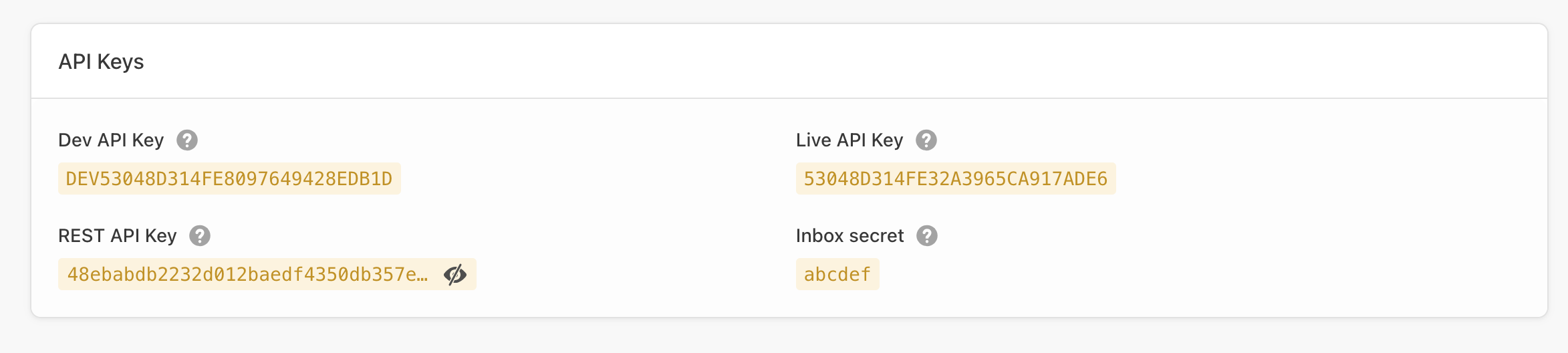
The `BATCH_API_KEY` value is either your **Live**, **Dev** or **SDK** Batch API key from the settings page of your app within the dashboard *(Settings → General)*:
The API key changes the behaviour of the campaign:
* **Dev API**: Only apps built with the Dev API Key will receive messages.
* **Live API**: Depending on the targeting you set for your campaigns, apps built with the Live API key will receive messages. Apps built with the Dev API key will receive all the messages you send.
> Please note Batch manages each platform separately, so you will have to call the API twice with a different Dev/Live API key if you want to target iOS and Android.
#### Headers
In order to authenticate with the API, you need to provide your **company REST API Key** as the value of the `X-Authorization` header. You can find it in ⚙ Settings → General.
> **Insufficient privileges issue**: You may see that error in the REST API key field. This happens because the REST API key is only visible to managers. Make sure the managers of the account share that key with you or ask them to grant you access through the team manager.
#### Post data
The body of the request must contain a **valid JSON payload** with all the parameters you chose to add for your campaign: campaign name, schedule, recurrency, targeting, messages and more.
Here is how a minimal and valid JSON payload looks like:
```json
{
"name": "Test Campaign",
"local_start_date": "2017-06-01T14:00:00",
"live": true,
"trigger": {
"capping": 1,
"when": "NEXT_SESSION"
},
"landing": {
"theme": "HELLO-THEME",
"image": "https://static.batch.com/documentation/logo_batch_192.png",
"contents": [
{
"language": "en",
"header": "Welcome",
"title": "Hello!",
"body": "How is it going?",
"actions": [
{
"label": "Continue",
"action": "continue"
}
]
}
]
}
}
```
> **REQUIRED** >\
> Check out the [list of available parameters](/developer/api/mep/in-app-campaigns-api/parameters.md) to create your first In-App campaign with the API.
### Responses
#### Success
If the POST to the API endpoint is successful you will receive an **HTTP 201** confirmation and **a token**:
```
{"campaign_token":"a0082dc6860938a26280bd3ba927303b"}
```
Once you get your token, you can use it to [update](/developer/api/mep/in-app-campaigns-api/update.md) your campaign.
#### Failure
If the POST data does not meet the API requirements you will receive an actionable error message. Contact us at if you need further support.
* `AUTHENTICATION_INVALID` (Http status code: 401, Error code: 10)
* `API_MISUSE` (Http status code: 403, Error code: 12)
* `ROUTE_NOT_FOUND` (Http status code: 404, Error code: 20)
* `MISSING_PARAMETER` (Http status code: 400, Error code: 30)
* `MALFORMED_PARAMETER` (Http status code: 400, Error code: 31)
* `MALFORMED_JSON_BODY` (Http status code: 400, Error code: 32)
* `SERVER_ERROR` (Http status code: 500, Error code: 1)
* `MAINTENANCE_ERROR` (Http status code: 503, Error code: 2)
* `TOO_MANY_REQUESTS` (Http status code: 429, Error code: 60)\
If you get a "too many requests" response, please wait for at least 5 seconds before trying again. Further requests might still return this error.
---
# Agent Instructions
This documentation is published with GitBook. GitBook is the documentation platform designed so that both humans and AI agents can read, navigate, and reason over technical content effectively. Learn more at gitbook.com.
## Querying This Documentation
If you need additional information that is not directly available in this page, you can query the documentation by asking a question.
Perform an HTTP GET request on the following URL with the `ask` and `goal` query parameters:
```
GET https://doc.batch.com/developer/api/mep/in-app-campaigns-api/create.md?ask=&goal=
```
`ask` is the immediate question: it should be specific, self-contained, and written in natural language.
`goal` is what the user is ultimately trying to achieve, the reason they need the answer. Sharing it helps GitBook give you a better, more relevant answer. A goal is most helpful when it describes the outcome the user wants rather than restating the question. For example, with `ask=how do I create an API token`, a goal like `automate deployments from our CI pipeline` lets GitBook tailor the answer to that use case.
The response will contain a direct answer to the question and relevant excerpts and sources from the documentation.
Use this mechanism when the answer is not explicitly present in the current page, you need clarification or additional context, or you want to retrieve related documentation sections.