# POST - Create

The App Data API enables you to create, update, delete and list data you associated to your application. **App Data** lets you create **tables** of key/value pairs. It is for **application** centric data as opposed to **user** centric data. You can use the data in your targeting queries and/or in a message template.

### Request structure

#### Route

The App Data API exposes a POST endpoint that lets you create a **table**:

`https://api.batch.com/1.0/BATCH_API_KEY/app-data/TABLE_NAME`

Here is a valid cURL example:

```bash
curl -H "Content-Type: application/json" -H "X-Authorization: BATCH_REST_API_KEY" -X POST -d "@payload.json" "https://api.batch.com/1.0/BATCH_API_KEY/app-data/TABLE_NAME"
```

The `TABLE_NAME` must be a string that only contains letters, numbers or the following characters: `_`, `-`.

Since the available table size is limited **we strongly encourage you to set the retention on your data** and watch closely how much size your table is using, especially if you're inserting values into the same table on a regular basis.

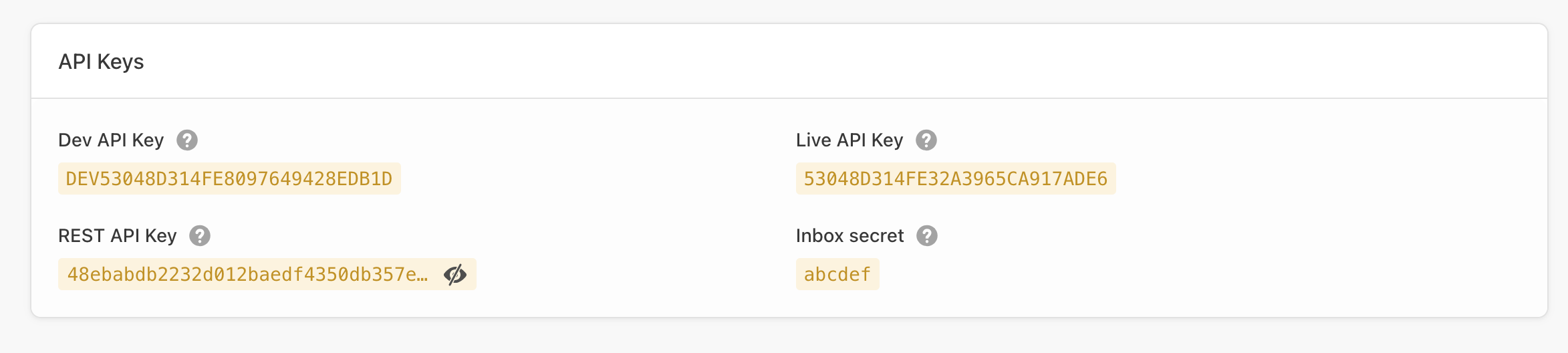
The `BATCH_API_KEY` value is either your **Live**, **Dev** or **SDK** Batch API key from the settings page of your app within the dashboard *(Settings → General)*:&#x20;

<figure><img src="/files/jerST0u1BBqrZgUJ87HY" alt=""><figcaption></figcaption></figure>

> Please note Batch manages each platform separately, so you will have to call the API twice with a different Dev/Live API key if you want to target iOS and Android.

#### Headers

In order to authenticate with the API, you need to provide your **company REST API Key** as the value of the `X-Authorization` header. You can find it in ⚙ Settings → General.

> **Insufficient privileges issue**: You may see that error in the REST API key field. This happens because the REST API key is only visible to managers. Make sure the managers of the account share that key with you or ask them to grant you access through the team manager.

#### Post data

The body of the request must contain a **valid JSON payload** optionally containing the description, and `time_to_live` (retention).

Here is a how a complete JSON payload looks like:

```json
{
  "description": "The app-data description",
  "time_to_live": 90
}
```

Let's see the parameters in detail.

<table><thead><tr><th width="184.5">Id</th><th width="531.5">Description</th></tr></thead><tbody><tr><td><code>description</code></td><td><strong>string</strong> - <em>Optional</em><br>Description of the Application Data table.<br><em>E.g.</em><code>{"description":"The table description"}</code></td></tr><tr><td><code>time_to_live</code></td><td><strong>integer</strong> - <em>Optional</em><br>The time to live (retention) of the values once they've been set by the update method. In days<br><em>E.g.</em><code>{"time_to_live":24}</code></td></tr></tbody></table>

### Responses

#### Success

If the POST to the API endpoint is successful you will receive an **HTTP 201** confirmation and an empty json payload.

#### Failure

If the POST data does not meet the API requirements you will receive an actionable error message. Contact us at <support@batch.com> if you need further support.

* `AUTHENTICATION_INVALID` (Http status code: 401, Error code: 10)
* `API_MISUSE` (Http status code: 403, Error code: 12)
* `ROUTE_NOT_FOUND` (Http status code: 404, Error code: 20)
* `MISSING_PARAMETER` (Http status code: 400, Error code: 30)
* `MALFORMED_PARAMETER` (Http status code: 400, Error code: 31)
* `MALFORMED_JSON_BODY` (Http status code: 400, Error code: 32)
* `ENTITY_ALREADY_EXISTS` (Http status code: 400, Error code: 33)
* `SERVER_ERROR` (Http status code: 500, Error code: 1)
* `MAINTENANCE_ERROR` (Http status code: 503, Error code: 2)


---

# Agent Instructions: Querying This Documentation

If you need additional information that is not directly available in this page, you can query the documentation dynamically by asking a question.

Perform an HTTP GET request on the current page URL with the `ask` query parameter:

```
GET https://doc.batch.com/developer/api/mep/app-data/create.md?ask=<question>
```

The question should be specific, self-contained, and written in natural language.
The response will contain a direct answer to the question and relevant excerpts and sources from the documentation.

Use this mechanism when the answer is not explicitly present in the current page, you need clarification or additional context, or you want to retrieve related documentation sections.
